Wave: разбор результатов сканированияWave: triaging scan results
AI-модуль триажа уязвимостей: статус проверки, вероятность и объяснение — финальное решение остаётся за аналитиком.An AI triage module for vulnerabilities: check status, probability and explanation — the final decision stays with the analyst.
Context
В enterprise AppSec после каждого скана аналитик получал сотни находок — реальные уязвимости вперемешку с false positive. Каждую нужно было открыть, проверить компонент, paths и контекст в коде. На больших проектах разбор одного скана растягивался на часы, и с ростом объёма росла цена ошибки: пропустить реальную уязвимость или потратить день на ложную.In enterprise AppSec, every scan left the analyst with hundreds of findings — real vulnerabilities mixed with false positives. Each one had to be opened and checked against its component, paths and context in the code. On large projects, triaging a single scan stretched into hours, and as the volume grew so did the cost of a mistake: miss a real vulnerability, or burn a day on a false one.
Design challenge
Главный риск — превратить AI в ещё один «чёрный ящик». Интерфейс должен был ускорять triage, но показывать, что проверено, почему AI так решил и где вывод можно подтвердить.The main risk was turning AI into yet another “black box.” The interface had to speed up triage while showing what was checked, why AI decided so and where the conclusion can be confirmed.
Моя рольMy role
Проектировала UX AI-триажа: статусы проверки на уровне проекта, скана и находки, выбор режима анализа и карточку AI-вердикта. Работала с ML-командой, PM и аналитиками безопасности, чтобы перевести модельные сигналы в понятный рабочий интерфейс.I designed the UX of AI triage: check statuses at the project, scan and finding level, the analysis-mode choice and the AI verdict card. I worked with the ML team, PM and security analysts to translate model signals into a clear working interface.
ЗадачиGoals
- Разложить AI-проверку на состояния для проекта, скана и отдельной находкиBreak the AI check into states for the project, the scan and an individual finding
- Спроектировать режимы Full scan, Prediction only и Explanation onlyDesign the Full scan, Prediction only and Explanation only modes
- Собрать карточку AI-вердикта с prediction, explanation и конфликтом сигналовBuild the AI verdict card with prediction, explanation and signal conflict
- Встроить triage-действие в существующие статусы, историю решений и проверку кодаEmbed the triage action into existing statuses, decision history and code review
Ключевые решенияKey decisions
Как показать AI-вердикт: один бейдж или два сигнала.How to show the AI verdict: one badge or two signals. Выбрала показывать вероятность и объяснение раздельно, а расхождение между ними оставлять видимым, — так аналитик проверяет логику, а не принимает вывод на веру. Отбросила единый бейдж «уязвимость / не уязвимость»: он прячет неопределённость, превращает AI в чёрный ящик и провоцирует слепое согласие.I chose to show probability and explanation separately and to keep any conflict between them visible, so the analyst checks the logic instead of taking the conclusion on faith. I rejected a single “vulnerable / not vulnerable” badge: it hides uncertainty, turns AI into a black box and invites blind agreement.
Глубина AI-проверки: всегда полный анализ или выбор режима.AI check depth: always a full analysis or a choice of mode. Выбрала три режима — Full scan, Prediction only, Explanation only — прямо из строки скана, потому что быстрый triage и глубокий разбор это разные задачи. Отбросила обязательный full scan для каждой находки: на сотнях находок это дорого по времени и избыточно для очевидных случаев.I chose three modes — Full scan, Prediction only, Explanation only — right from the scan row, because fast triage and deep review are different jobs. I rejected a mandatory full scan for every finding: across hundreds of findings it is expensive in time and redundant for obvious cases.
Кто принимает финальное решение: AI или человек.Who makes the final call: AI or a human. Выбрала оставить решение за аналитиком: AI готовит вердикт и evidence, но подтверждает, отклоняет или игнорирует находку человек, и это фиксируется в истории решений. Отбросила авто-закрытие находок по порогу вероятности: его нельзя защитить на аудите, а один false negative — это пропущенная реальная уязвимость.I chose to keep the decision with the analyst: AI prepares the verdict and evidence, but a human confirms, rejects or ignores the finding, and that is recorded in the decision history. I rejected auto-closing findings by a probability threshold: it can't be defended in an audit, and a single false negative is a missed real vulnerability.
РешениеSolution
Единая платформа — split-screen workspace вместо переходов между страницами:One platform — a split-screen workspace instead of page-to-page navigation: список отчётов остаётся слева, детали и действия открываются справа, поэтому аналитик разбирает находки, не теряя общий контекст. Слева видно прогресс, прогноз, число проблем и дату по каждому отчёту; справа собраны рекомендации, severity, список уязвимостей, evidence и triage-действия.the report list stays on the left while details and actions open on the right, so the analyst triages findings without losing the overall context. The left panel shows progress, prediction, issue count and date per report; the right panel brings together recommendations, severity, the vulnerability list, evidence and triage actions.
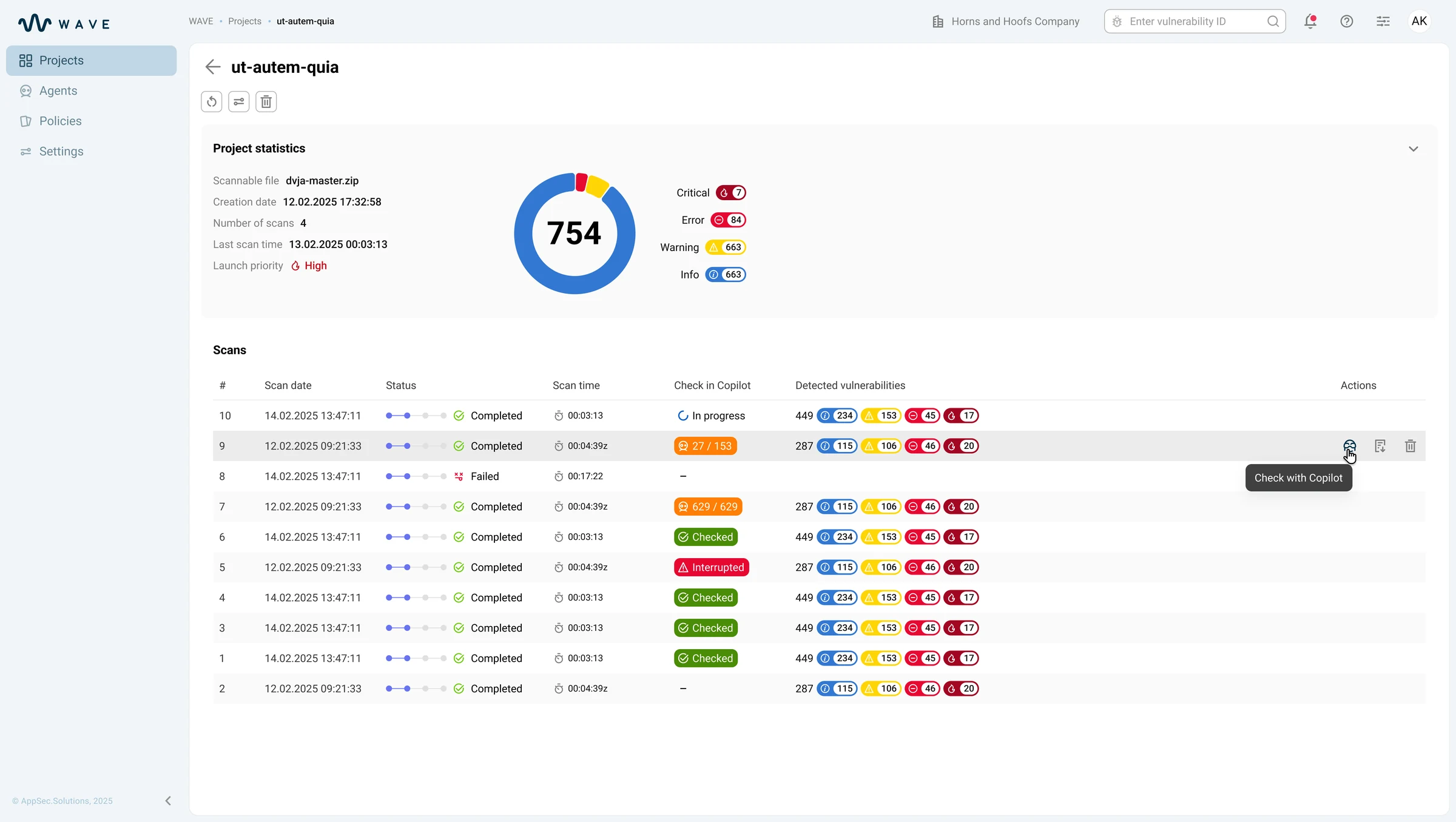
Статус AI-проверки на уровне проекта и каждого скана:AI check status at the project and per-scan level: в таблице сканов сразу видно, где AI-проверка не запускалась, где идёт анализ, что завершено и где проверка прервалась.the scans table immediately shows where the AI check hasn't run, where analysis is in progress, what is completed and where the check was interrupted.
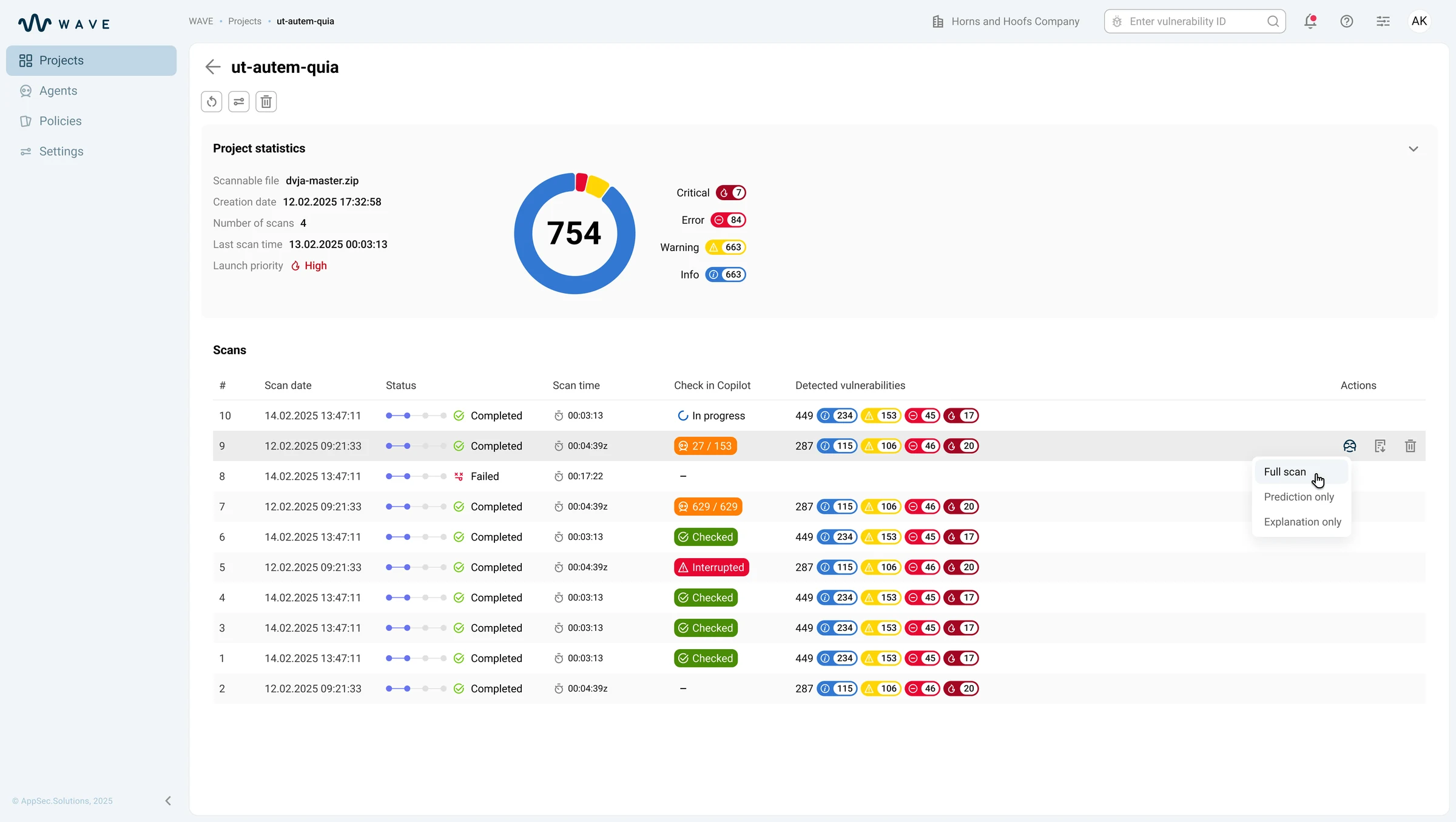
Выбор глубины проверки: Full scan, Prediction only, Explanation only:Choosing the check depth: Full scan, Prediction only, Explanation only: из строки скана команда выбирает полную проверку, только prediction или только explanation. Так интерфейс поддерживает и быстрый triage, и глубокую проверку.from a scan row the team picks a full check, prediction only or explanation only. This way the interface supports both fast triage and deep review.
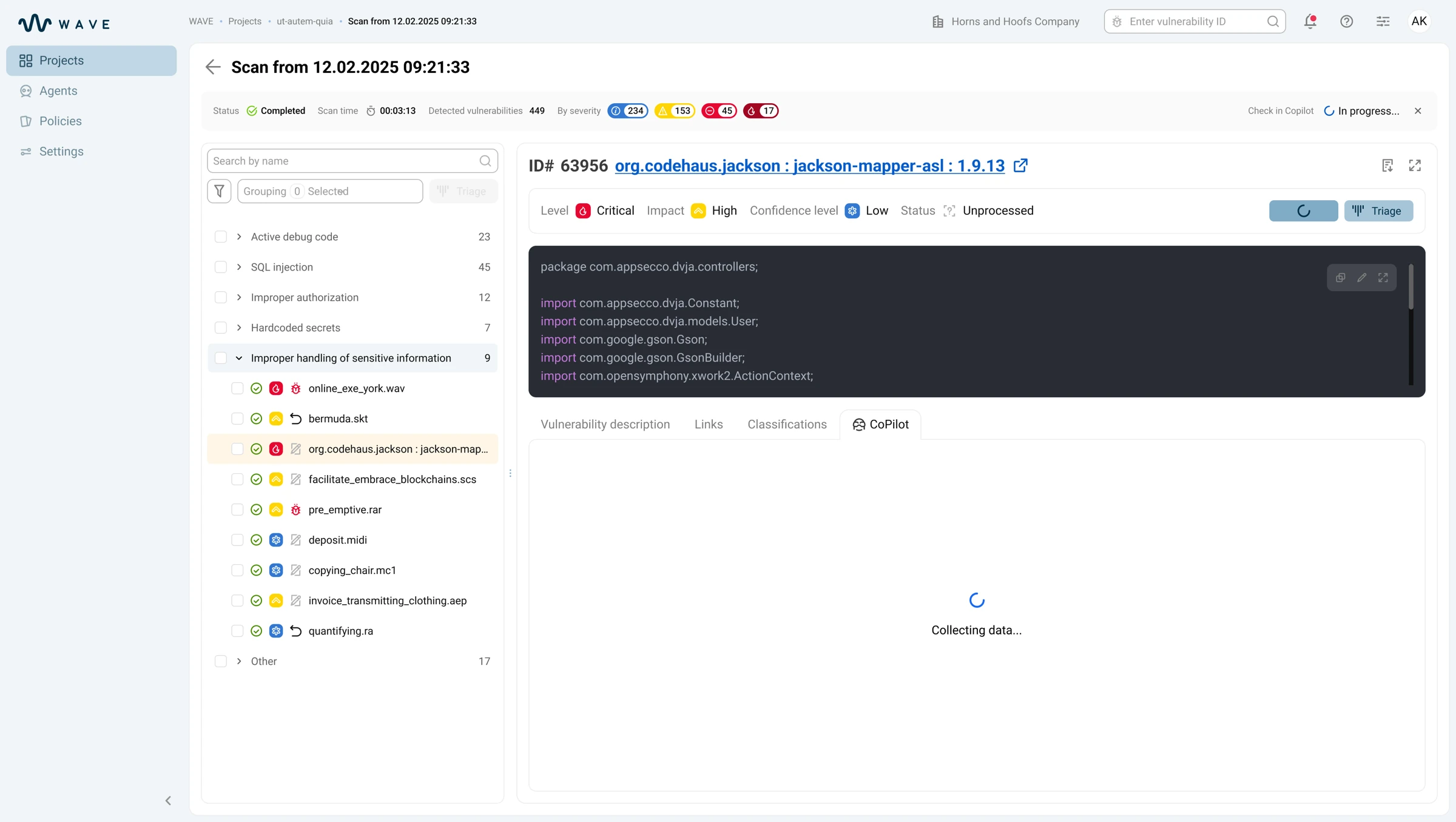
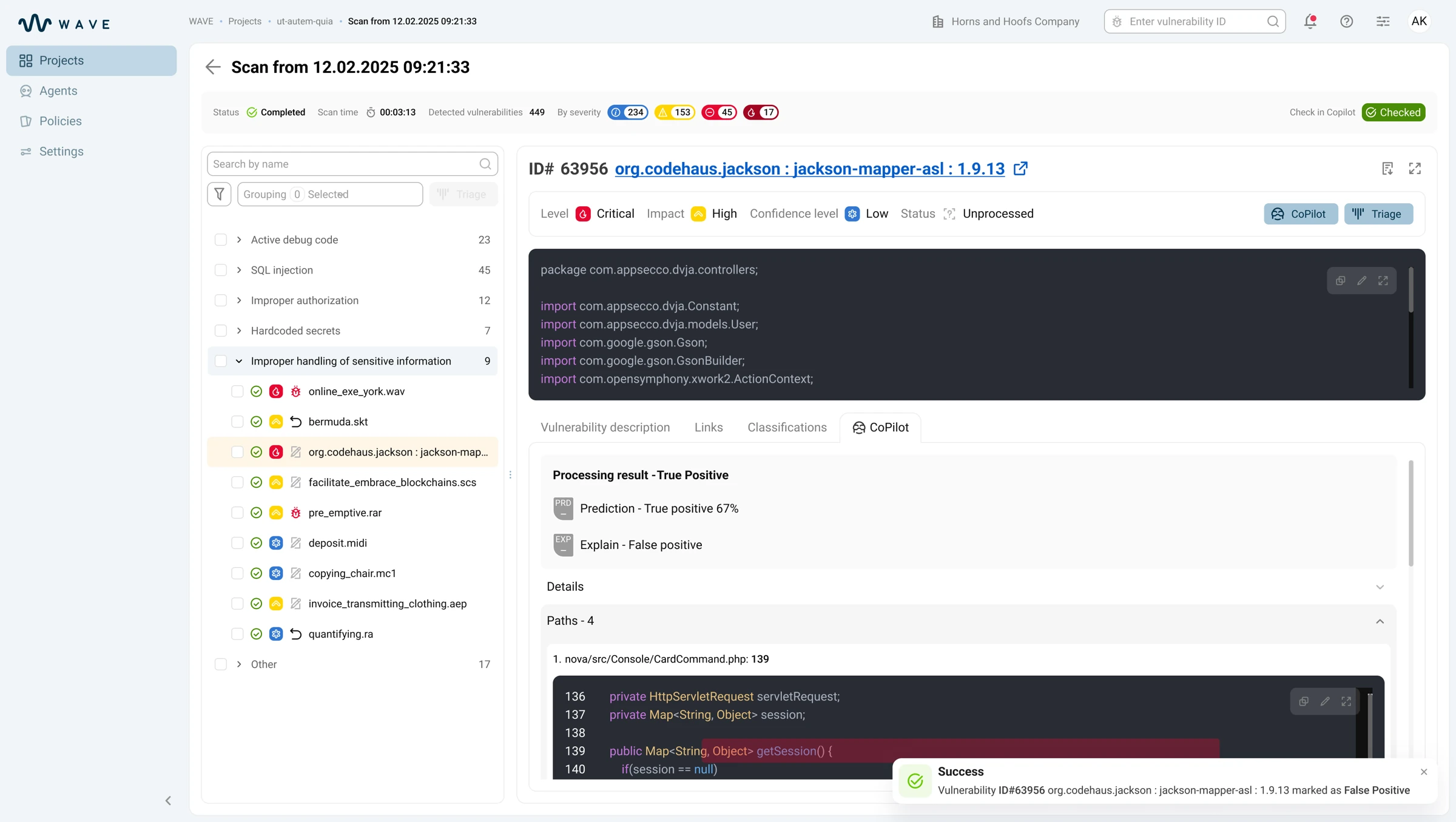
Prediction и explanation: два сигнала вместо одного вердикта:Prediction and explanation: two signals instead of one verdict: во вкладке CoPilot вердикт не спрятан в один бейдж: аналитик видит вероятность, объяснение и paths к коду. Если сигналы расходятся, конфликт остаётся видимым.in the CoPilot tab the verdict isn't hidden in a single badge — the analyst sees the probability, the explanation and paths to code. If the signals diverge, the conflict stays visible.
РезультатOutcome
- ≈ −60% времени на разбор большого скана≈ −60% time to triage a large scan — с ~6–8 ч до ~2–3 ч: prediction и explanation отсеивают false positive до открытия кода.— from ~6–8 h to ~2–3 h: prediction and explanation filter out false positives before opening the code.
- ≈ 2 из 3 находок закрываются без открытия кода≈ 2 in 3 findings closed without opening the code — вероятность, объяснение и paths стоят рядом, поэтому очевидные закрываются прямо по вердикту.— probability, explanation and paths sit side by side, so the obvious ones are closed straight on the verdict.
- 100% решений прослеживаемы:100% of decisions are traceable: каждый вердикт подтверждается, отклоняется или игнорируется человеком с опорой на explanation, paths и общий след решений — разбор можно защитить на аудите.every verdict is confirmed, rejected or ignored by a human based on the explanation, paths and the overall decision trail — the triage can be defended in an audit.